Dragon Dictation for Mac in 2026: What to Use Instead

Dragon is what most people mean when they say dictation software, and on the Mac it no longer exists. Dragon Dictate for Mac was discontinued in 2018 and never replaced. Dragon Anywhere, the mobile version that a lot of stranded Mac users fell back on, shut down on 1 July 2026.
We build Kana, a Mac dictation app, so we have an interest here. This piece is about what happened and what your options are, and it is going to be direct about the things Dragon still does that nothing on this site can touch.
Short answer: on Windows, Dragon Professional v16 is still the strongest product in this category and nothing here replaces it. On a Mac, there is no current Dragon to buy, and what you replace it with depends entirely on whether you were using its voice commands and macros or only its transcription.
What happened to Dragon on the Mac
Dragon Dictate for Mac, later Dragon Professional Individual for Mac, was discontinued in 2018. There has been no Mac release since. The line continued on Windows, and Dragon Professional v16 is what is sold today, described on its own page as optimised for Windows 11 and backwards compatible to Windows 10.
Pricing is no longer published on that page. It directs you to contact them. The figure that has been quoted for a v16 licence is around $700 as a one-time purchase, and the medical editions have always cost several times that.
For Mac users the practical position is simple: running Dragon means running Windows, in a virtual machine or on another machine, and accepting the audio routing and latency that comes with it. Some people do exactly that and are happy. Most do not.
Dragon Anywhere is gone as well
Dragon Anywhere was the mobile product, and for years it was the honest answer to what a Mac user with a Dragon habit should do. Sales and renewals ended on 1 July 2026, with the notices posted on its App Store and Google Play listings.
That closed the last officially supported door. If you are searching for Dragon for Mac in 2026, you are not looking for a version you missed. There is not one.
What Dragon still does that nothing here matches
This is the section that most Dragon alternative pages skip, and skipping it is why they are not useful to anybody who has actually used it.
Spoken correction. Dragon lets you fix a misrecognition by talking about it, selecting a phrase by voice and replacing it, and it learns from the correction. Modern AI dictation apps do not correct, they re-dictate. If you have built a habit around correcting by voice, losing it is the change you will feel most.
Voice commands that drive the machine. Not punctuation, actual control: opening applications, moving around documents, filling fields, running steps in an order.
Macros. Nuance’s own page describes creating macros that automate multi-step workflows by voice, and custom commands that insert boilerplate. If your work runs on a macro set built over years, nothing in the current generation of dictation apps replaces it, and no article should pretend otherwise. Kana certainly does not.
Professional vocabularies. Legal and medical vocabularies built up over decades of deployment, sold as specialist editions.
Batch and enterprise machinery. An Auto Transcribe Folder Agent for processing recorded audio in bulk, digital recorder integration, and central administration through Nuance Management Center.
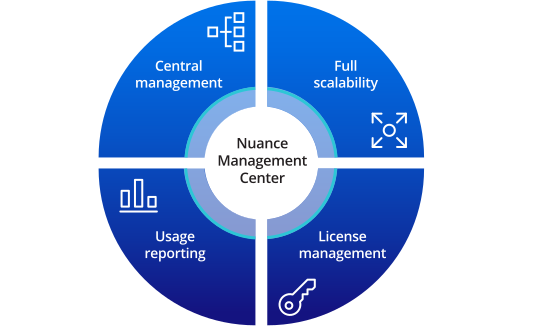
Source: Nuance (dragon.nuance.com)
That diagram tells you who the product is for now. Central management, usage reporting and licence management are things an IT department buys, not things an individual writer needs. Dragon in 2026 is enterprise software with a long tail of individual users still attached to it.
Nuance’s own claims for v16 are that you dictate three times faster than typing with up to 99 percent recognition accuracy. Those are their numbers, on their page, and we have run no comparison of our own, so we will not put a rival number next to them.
What Dragon does better than Kana
Everything in the section above, and one more thing: Dragon runs on Windows and Kana does not run on Windows at all.
Kana has no voice commands, no spoken correction, no macros, no legal or medical vocabulary, and no central administration. It is a menu bar app on Apple Silicon Macs that inserts text at your cursor. Set against a full Dragon deployment, that is a much smaller product, and the only sensible claim to make is that it is a current one on the platform you are actually using.
| Dragon | Kana | |
|---|---|---|
| Available for Mac | No, discontinued in 2018 | Yes, Apple Silicon |
| Windows | Yes, Professional v16 | No |
| Mobile | No, Dragon Anywhere ended 1 July 2026 | No |
| Voice commands and macros | Yes, on Windows | No |
| Spoken correction | Yes | No |
| Legal and medical vocabularies | Yes | No |
| Central administration | Yes | No |
| Voice profile training before use | Yes | No, pick a hotkey and speak |
| Runs on your machine | Yes | Yes |
| File transcription | Yes, on Windows | Yes, with SRT and VTT |
| Price | Around $700 on Windows, not published on the current page | $9.99 once |
What Mac users actually switch to
Work out which half of Dragon you were using.
If it was the command and control half, look at accessibility-first options first. macOS Voice Control is free, built in, and drives the whole machine by voice. It is weaker than Dragon at dictation quality and vocabulary, and it is the closest thing on the Mac to what you had.
If it was the transcription half, hold a key and talk, then get clean text, and the current generation of Mac dictation apps does that well.
Kana is one of them. Transcription runs on the Mac itself, English and 17 other European languages on Parakeet on the Neural Engine, Japanese on a Parakeet model of its own, Chinese and Korean on Apple’s SpeechAnalyzer, 22 languages in total. There is no voice profile to train first. You pick a hotkey and start.
Dictation is unlimited, and so is file transcription, with SRT, VTT and Markdown export. Dictation makes zero network calls, checked in CI. Custom vocabulary handles the names a general model gets wrong. Kana is $9.99 once, and AI rewriting is the one subscription, at $4.90 a month or $49 a year, covering three Macs, and the pricing page has the detail.
The app bundle is 6.5 MB with no background service and no account, though the speech model itself is a separate download of about 480 MB.
For the two set out row by row, including the rows Dragon wins, there is the Kana and Dragon comparison.
Who should stay with Dragon
- You are on Windows and Dragon already works for you
- Your day runs on voice commands, macros, or spoken correction
- You need a legal or medical vocabulary with real depth behind it
- You are deploying dictation across a team and need central licensing and usage reporting
- You batch-process recorded audio through the folder agent
Who should use a Mac dictation app instead
- You are on a Mac and there is no Dragon to buy
- You were using Dragon mostly to turn speech into text, not to control the computer
- You do not want to run Windows in a virtual machine to dictate an email
- You want to skip the voice profile training step
- You want dictation that costs $9.99 once rather than a several hundred dollar licence
FAQ
Is there a Dragon for Mac in 2026?
No. Dragon Dictate for Mac was discontinued in 2018 and has not been replaced. Dragon Professional v16 is Windows only, and Dragon Anywhere for mobile ended on 1 July 2026.
What happened to Dragon Anywhere?
Sales and renewals ended on 1 July 2026, with notices posted on the App Store and Google Play listings for the app.
How much does Dragon cost now?
The Dragon Professional v16 page no longer lists a price and asks you to contact them. The figure usually quoted for a licence is around $700 as a one-time purchase, with medical editions costing considerably more.
What is the best Dragon alternative for Mac?
It depends which part of Dragon you used. For voice control of the whole machine, macOS Voice Control is the closest free option. For turning speech into text quickly and accurately, a current Mac dictation app such as Kana does that job, without the macros, the spoken correction, or the specialist vocabularies.