Saner.ai Review 2026: ADHD Notes, Email and Calendar
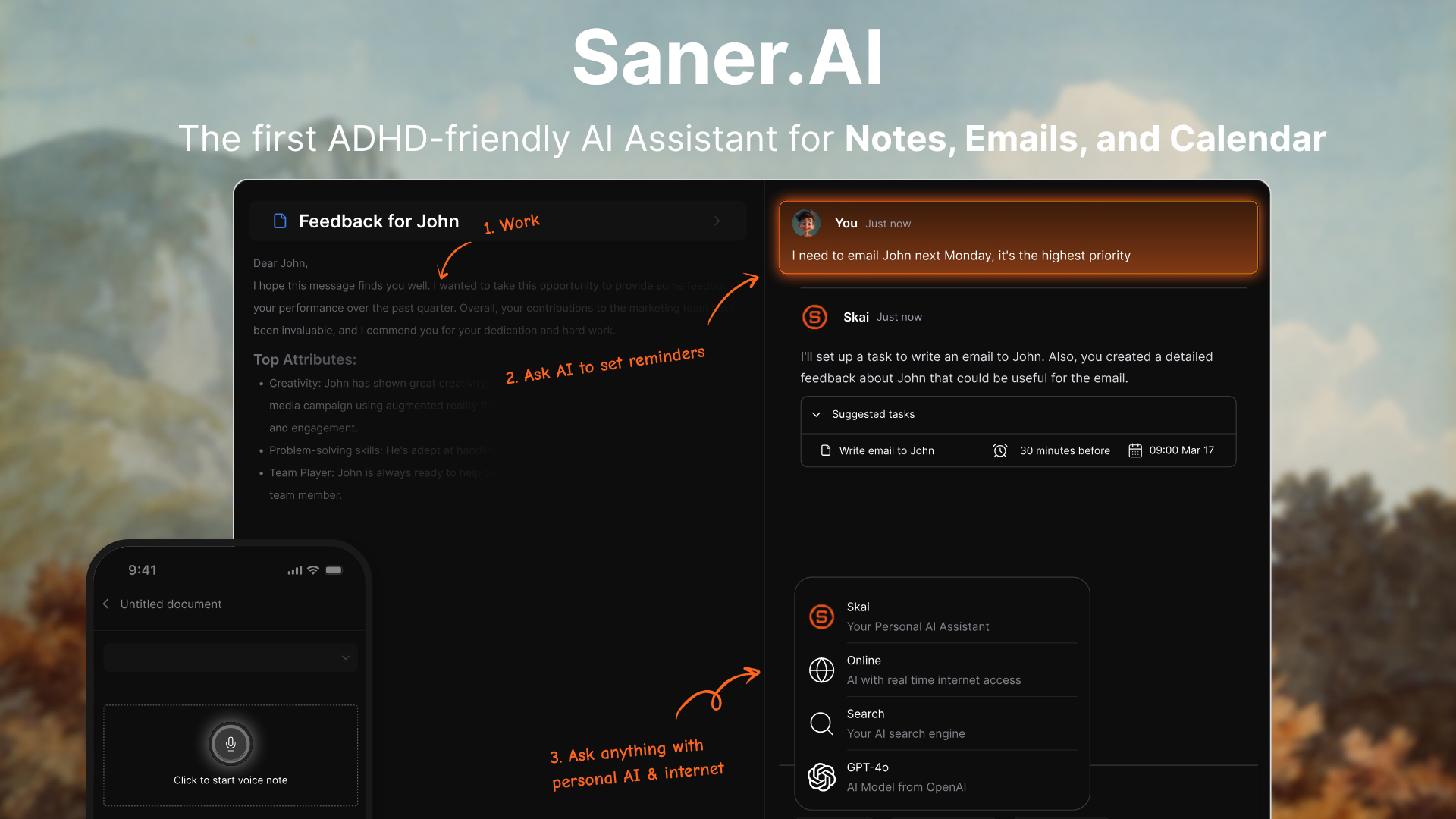
Saner.ai is an AI assistant built around ADHD, holding your notes, email and calendar in one place and answering questions about them. Voice capture is one of the ways material gets in. It is not a dictation app, and people arrive at comparisons like this one because both products let you talk instead of type.
We build Kana, a Mac dictation app. The two overlap for about ten seconds of your day, and the useful thing this article can do is tell you which of the two problems you actually have.
Short answer: if the point is that a thought you spoke gets captured, tagged, connected to your calendar and findable in three months, Saner.ai is the product and Kana cannot do any of it. If the point is that words come out of your mouth and appear in the text field you were already looking at, Kana is a keyboard and Saner is not.
What Saner.ai actually is
A workspace. Notes, tasks, email and calendar live inside it, and an assistant called Skai sits on top of them. You write or speak something in, and it gets turned into a note or a task without you first deciding on a folder or a tag. Tagging happens afterwards, by the assistant.
The parts the company puts forward are the ones that matter for the ADHD case it is built for: tasks pulled out of notes and emails without you filing them, due dates written in ordinary language, reminders it suggests rather than ones you remember to set, and a daily plan proposed from your inbox and calendar in the morning before you have asked for one.
Search is the other half. You ask for the thing the way you remember it rather than the way you filed it, and it returns notes by meaning rather than by exact word match. For anyone whose notes app has become a place where ideas go to be lost, that is the whole pitch.
Source: Saner.AI (saner.ai)
It runs on the web, on desktop, as a Chrome extension and on mobile. There is an account, because there has to be: the whole product is the store.
Where voice fits in Saner.ai
One tap starts a voice note. You speak, and what you said becomes a note inside Saner, where the assistant can tag it, pull a task out of it and find it later.
That is a capture feature, and it is the correct design for what Saner is. It is a different job from dictation. Dictation means the words go into the email you are already writing, the Slack message you are already in, the commit message, the form field, the reply box. Saner’s voice note goes into Saner.
Neither is better. They are answers to different questions, and mixing them up is how people end up disappointed with a good product.
Pricing in 2026
There is a free plan, and the site’s own summary is a free plan with an upgrade at $8 a month, with early user discounts mentioned. Paid tiers run up to around $16 a month depending on what you need.
For a product that holds your mail, your calendar and your notes and runs an assistant over all three, that is a normal price. Compare it against what you pay for a notes app plus a task app plus whatever you use to remember things, rather than against a dictation utility.
| Saner.ai | Kana | |
|---|---|---|
| Stores and searches what you captured | Yes | No |
| Email and calendar | Yes | No |
| Assistant that answers questions about your notes | Yes | No |
| Types into any app on your Mac | No | Yes |
| Voice capture | Yes, into Saner | Yes, into whatever has focus |
| Transcription runs on your machine | No | Yes |
| Account required | Yes | No |
| Platforms | Web, desktop, Chrome, mobile | Apple Silicon Macs only |
| Cost | Free plan, then from $8 a month | $9.99 once |
What Saner.ai does better than Kana
This is not a close call in either direction, which is why the honest version is short.
It remembers. Kana has no store. When the text has been inserted, nothing is kept. There is no list of past dictations, no search over them, no way to ask what you said about a project last month. Saner is built entirely around that question.
It touches your email and calendar. Kana has no idea what your calendar is. Saner reads your inbox, proposes a plan for the day, and turns a sentence into a task with a reminder attached.
It is designed for a specific difficulty. Executive function work, the loop where capturing an idea is easy and finding it again is not, is what Saner is aimed at. Kana is a typing speed tool. Being fast at typing does not help if the problem is that you never look at the note again.
It runs where you are. Web, desktop, Chrome and mobile. Kana runs on Apple Silicon Macs and nowhere else, so half your capture moments happen on a device it does not exist on.
Where Kana is the better tool
Kana is a key you hold. You hold it, speak, release, and the text is in the frontmost app, whether that is Mail, Slack, a browser text box or a terminal. There is no destination to choose because the destination is wherever your cursor already was.
Transcription runs on the Mac: English and 17 other European languages on Parakeet on the Neural Engine, Japanese on a second Parakeet model built for it, Chinese and Korean on Apple’s SpeechAnalyzer, 22 languages in total. Dictation makes zero network calls, which is checked in CI. There is no account and nothing to sign into.
Dictation and file transcription are unlimited, including SRT, VTT and Markdown export. Kana is $9.99 once, and AI rewriting is the one subscription, at $4.90 a month or $49 a year, covering three Macs.
If you want them next to each other on the points where they touch, the Kana and Saner.ai comparison has it, and it says the same thing this article does about where Saner is ahead.
Plenty of people should have both. Saner for the thoughts that need to survive the week, Kana for the sixty emails.
Who should use Saner.ai
- You have ADHD, or the same working pattern, and capture is easy while retrieval is not
- You want notes, tasks, email and calendar in one place instead of four
- You want an assistant that proposes a day rather than a blank list
- You want to ask questions about your own notes in ordinary language
- You capture on a phone as often as at a desk
Who should use Kana instead
- You want spoken words to land in the app you are already using
- You are on an Apple Silicon Mac
- You do not want a workspace, an account, or another place to check
- You want the audio to stay on your machine
- You also transcribe recordings and want subtitle files out of them
FAQ
Is Saner.ai a dictation app?
No. It has voice capture, which turns what you say into a note inside Saner, along with notes, tasks, email and calendar. Dictation in the sense of typing into other applications by voice is not what it does.
Can I use Saner.ai to dictate into Gmail or Slack?
Not directly. Saner’s voice capture puts the result into Saner. A dictation app puts the result at your cursor in whatever has focus, which is a different mechanism.
Is Saner.ai free?
There is a free plan. Paid plans start around $8 a month on the site’s own summary and run to roughly $16 depending on tier, with early user discounts mentioned.
Can I use Saner.ai and a dictation app together?
Yes, and it is a reasonable setup. Use the dictation app for writing into other applications, and let Saner hold the things you want to find again. They do not conflict.