MacWhisper Review 2026: Pricing, Features, and Verdict
MacWhisper is the app people name first when someone has a recording and needs a transcript out of it. It runs Whisper and Parakeet locally on your Mac, covers over 100 languages, and has been the default recommendation in Mac forums since 2023.
We build Kana, a dictation app that overlaps with one corner of what MacWhisper does. That overlap is smaller than the search results suggest, and this article is mostly about the difference.
Short answer: MacWhisper is the right tool if the work starts with a file. Interviews, podcasts, lecture recordings, subtitle timings you need to correct by hand. Pro is 64 euros once, which is cheap for what it is. If the work starts with your voice and ends in a text field, it is more app than you need.
What MacWhisper actually is
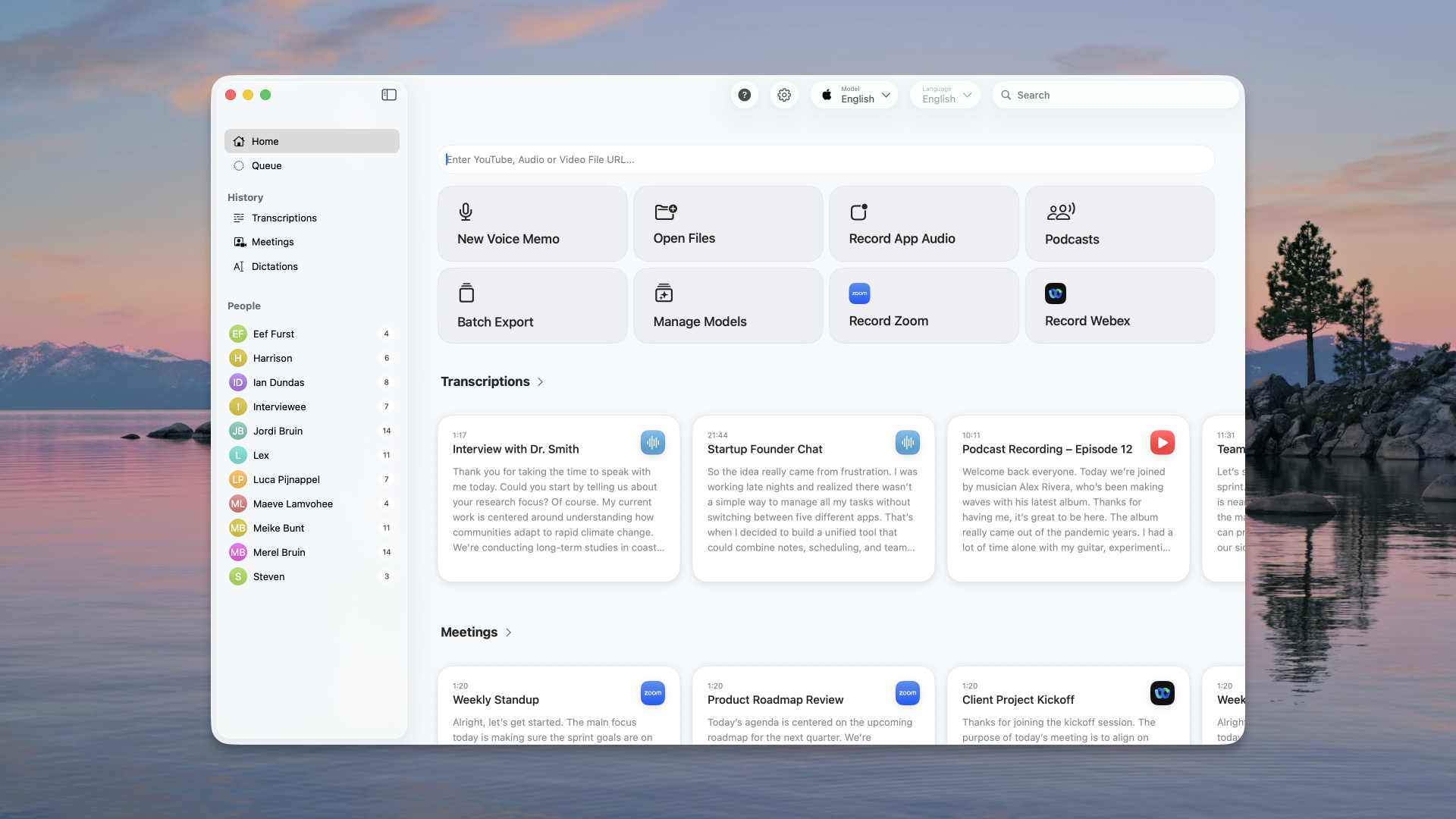
It is a transcription workstation. You drop in an audio or video file, paste a YouTube URL, record system audio, or capture a meeting from Zoom, Teams or Webex, and it gives you a transcript you can work with rather than a block of text you have to fix elsewhere.
The home window is the giveaway. Batch Export, Manage Models, Podcasts, a People list down the side with a count of how many recordings each speaker appears in. That is a tool built for someone who processes recordings as a repeating job, not for someone who wants to answer a Slack message with their voice.
Everything runs on your machine. The AI Services panel is the one exception, and it is opt-in: you add a provider (OpenAI, Anthropic, Google, Groq, xAI, Azure, Ollama, LMStudio, or a custom endpoint) with your own key if you want summaries or rewrites on top of the transcript.
Pricing in 2026
There is a real free tier, which a lot of comparison pages get wrong. Free gives you basic transcription, subtitle export as .srt and .vtt, system-wide dictation, and meeting recording. That is already more than most paid dictation apps ship.
Pro is 64 euros as a one-time purchase with lifetime updates. It adds the pieces that make it a workstation: speaker recognition, the transcript editor, batch transcription, translation, system audio recording, dictation with grammar improvement, and the advanced export formats (.md, .pdf, .html, .docx).
One payment, no subscription, updates included. For a tool you will use for years, that is the pricing model everyone else should be copying.
The transcript editor is the product
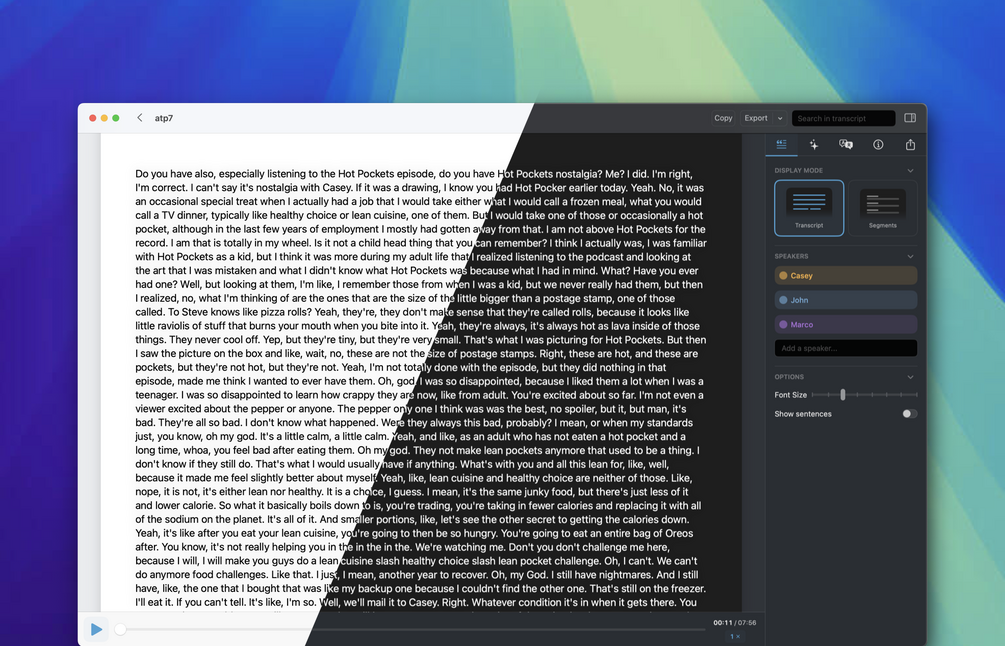
Speaker labels and a working editor are the reason to buy Pro, and they are the reason Kana does not compete here.
Source: MacWhisper (macwhisper.com)
You get playback synced to the text, a speakers panel you can name and correct, a segments view for subtitle timing, search inside the transcript, and export in whatever shape the next tool needs. Correcting a two-hour interview in that window takes an afternoon. Correcting it from an SRT file in a text editor takes a day and a half.
Kana exports SRT, VTT and Markdown from a file and stops. There is no editor, no playback sync, no speaker separation, and none of that is on a roadmap. If your job is editing recorded speech, MacWhisper is the right answer and it is not close.
It also does dictation
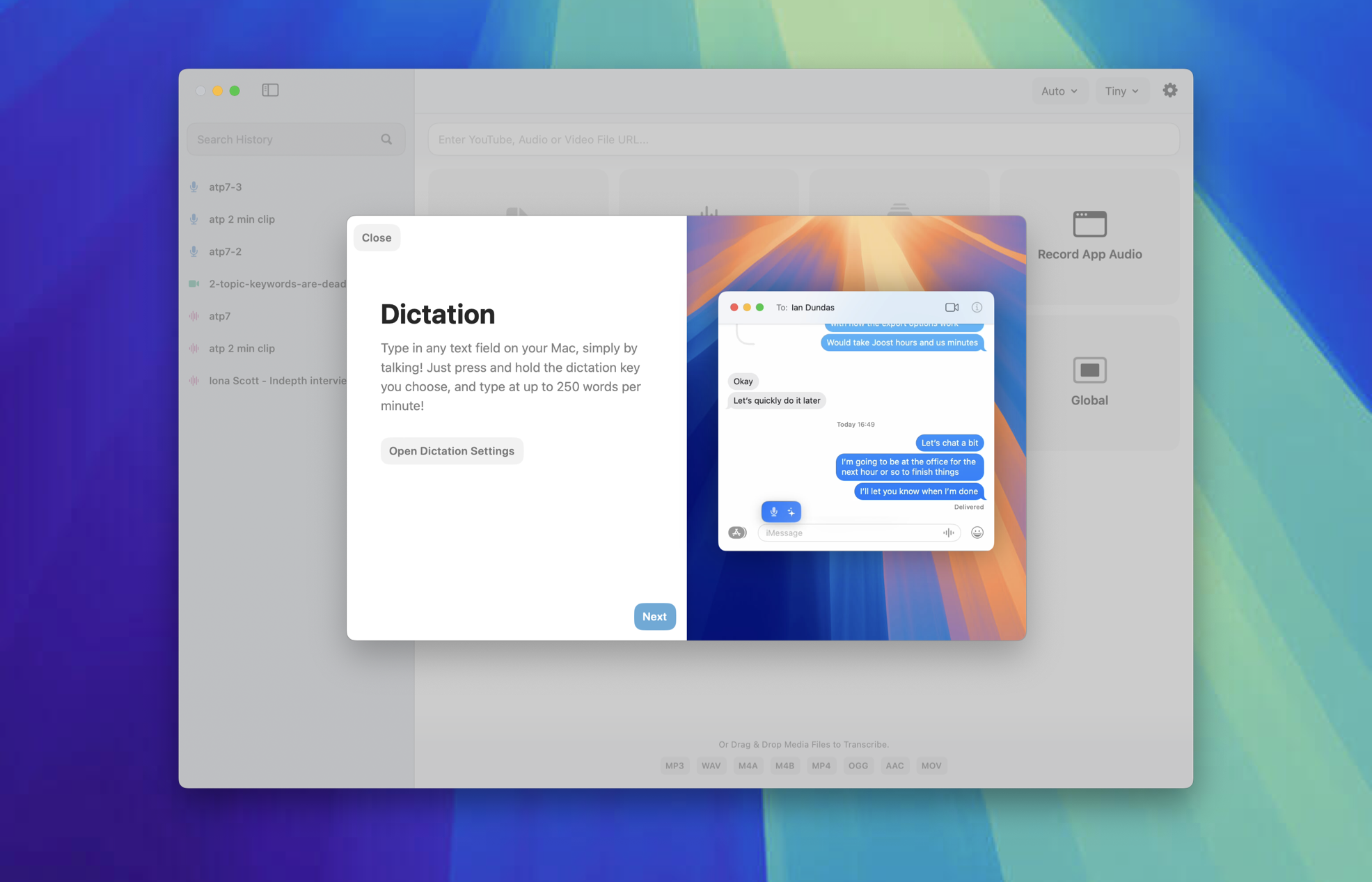
Worth being straight about, because our own comparison data was out of date on this point. MacWhisper has system-wide dictation in the free tier: press and hold a key you choose and type into any text field on your Mac. Its own onboarding claims up to 250 words a minute. Pro adds grammar improvement on top of the dictated text.
Source: MacWhisper (macwhisper.com)
So anyone telling you MacWhisper cannot do push-to-talk is out of date, us included until recently. The honest version is that dictation is a feature of a transcription app rather than the whole point, which shows up in the shape of the thing: MacWhisper is a windowed application you open, with a history, a queue and a model manager. Kana is a menu bar item with no window, no Dock icon and no stored history.
| MacWhisper | Kana | |
|---|---|---|
| Transcript editor with playback sync | Yes, Pro | No |
| Speaker recognition | Yes, Pro | No |
| Batch transcription | Yes, Pro | No |
| Meeting recording from Zoom, Teams, Webex | Yes | No |
| System-wide dictation | Yes | Yes |
| Runs on your Mac | Yes | Yes |
| Languages | 100+ | 22 |
| Speech model | Whisper and Parakeet | Parakeet, plus SpeechAnalyzer for zh and ko |
| Subtitle export | .srt and .vtt, free tier | SRT, VTT and Markdown |
| Price | Free tier, Pro 64 EUR once | $9.99 once, $4.90 a month with AI rewriting |
| Bring your own AI key | Yes | No, rewriting goes through our proxy |
Where Kana is the smaller tool
Kana is a menu bar app with no window and nothing in the Dock. Hold the modifier, speak, release, the text is in the app you were already typing in. That is the entire interaction.
Dictation and file transcription are unlimited, with SRT, VTT and Markdown export, and Dictation makes no network call at all. Paying gets you AI rewriting through our proxy, with no API key to supply: $4.90 a month or $49 a year, covering three Macs. Per-app routing means a Slack message and an email do not have to sound the same, and there is a blocklist for apps where rewriting should never run.
The bundle is 6.5 MB, with the speech model as a separate download of about 480 MB. There is no login item and no helper process.
We have not benchmarked the two against each other, so there is no speed chart in this article. Both apps run on your machine, and the difference you notice day to day is shape, not milliseconds.
For the row-by-row version, the Kana and MacWhisper comparison is here, including the rows MacWhisper wins.
Who should use MacWhisper
- You transcribe interviews, podcasts or lectures and have to edit the result
- You need speaker labels
- You cut subtitles and have to fix the timings
- You process recordings in batches
- You want meeting recording and dictation from one app you pay for once
- You dictate in a language outside Europe, Japanese, Chinese and Korean
Who should use Kana instead
- The recording you care about does not exist yet, because you are about to say it
- You want dictation running with nothing in the Dock and no window to manage
- You want file transcription with subtitle export without paying for a Pro tier
- You want AI rewriting without holding an API key
- You are on Apple Silicon and want the model on the Neural Engine
FAQ
Is MacWhisper free?
Yes, there is a permanent free tier with basic transcription, .srt and .vtt export, system-wide dictation and meeting recording. Pro is 64 euros once and adds the editor, speaker recognition, batch work, translation and the other export formats.
Does MacWhisper do dictation, or only files?
Both. Dictation into any text field is in the free tier, and Pro adds grammar improvement on the dictated text. Files are still what the app is built around.
Does MacWhisper send my audio anywhere?
Transcription runs on your Mac. The AI Services panel is the exception and it is opt-in: if you add OpenAI, Anthropic, Google or another provider with your own key, the text goes to that provider.
MacWhisper or a dedicated dictation app?
Ask where the work starts. If it starts with a file, MacWhisper. If it starts with your voice and ends in a text field somebody else is waiting on, a dictation app is a better fit and you will not miss the editor.