VoiceInk Review 2026: The Open Source Mac Dictation App
VoiceInk is the Mac dictation app people name first when someone asks for a free one. It is published under the GNU General Public License v3, the repository carries around 5,800 stars, and anyone with Xcode can build it and use it forever without paying.
We build Kana, which competes with it directly. That is a reason to read this closely, so everything below is either on VoiceInk’s own site, in its public repository, or in the screenshot.
Short answer: VoiceInk is the best answer for anyone who wants to read the source of the software listening to their microphone, or who wants a lot of settings. It runs local Whisper and Parakeet models, its Power Mode gives each app its own configuration, and the licence is a one-time $29 to $69 rather than a subscription. Kana is smaller, does not charge for dictation at all, and hands you fewer knobs.
What VoiceInk actually is
A push-to-talk dictation layer for macOS. You set a global shortcut, hold it, speak, and the text goes into the app in front of you. Recognition runs on your machine. The README describes “100% offline processing” and says your data never leaves your device, and it claims “99% accuracy” for its local models.
The system requirements point the same way as Kana’s, with a lower floor: Apple Silicon, macOS 14.4 or later, 8 GB of RAM recommended, where Kana asks for macOS 26. Neither app helps you on a 2019 MacBook Pro.
There is now an iOS app as well, downloaded separately from the Mac licence. Kana has no phone app and no plans for one.
The free path, and the paid one
This is the part that makes VoiceInk awkward to compete with, so it is worth being exact.
The source is on GitHub under GPL v3, with a BUILDING.md. Clone it, open it in Xcode, build it,
and you have the app. No trial, no licence key, no expiry. Every feature is in that repository.
If you would rather not compile anything, the site sells lifetime licences: Solo at $29 for one Mac, Personal at $49 for two, Extended at $69 for three. All three are described as “One-time purchase, lifetime access” with a “14-day money-back guarantee”. There is a free trial download before you buy.
That is a clean deal. You are paying for a signed build and for the maintainer’s time, not for access to a feature you would otherwise be denied.
Modes, models and the dictionary
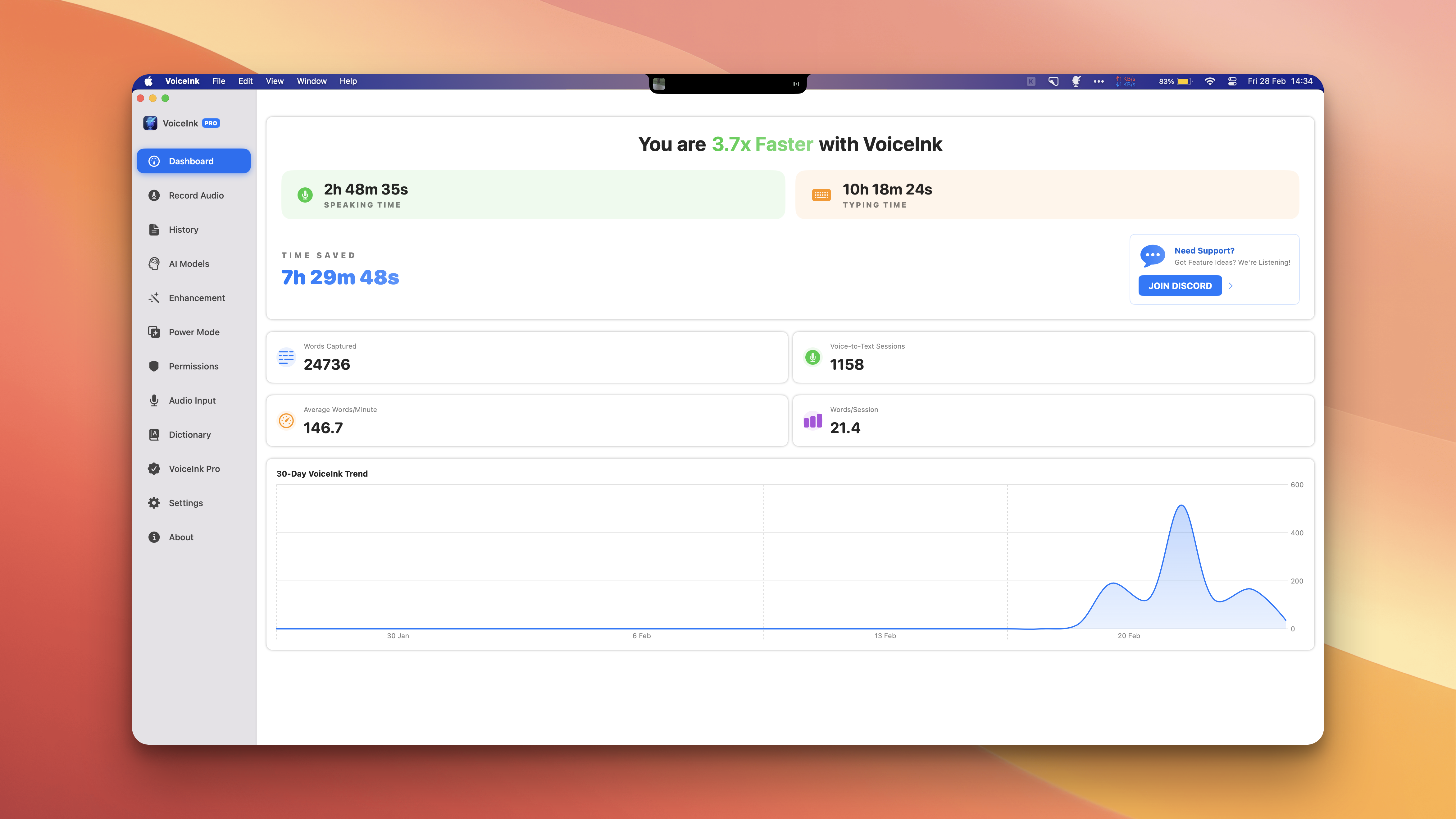
VoiceInk carries more surface area than most dictation apps, and the app window shows it.
Source: VoiceInk (tryvoiceink.com)
Three of those sidebar items carry most of the value.
AI Models. VoiceInk is not tied to one engine. The repository ships whisper.cpp for the Whisper family and a Parakeet implementation built on FluidAudio, and the site mentions WhisperKit too. You pick. Kana ships one model per language and does not expose the choice, so if you want to trade latency for accuracy on a long recording, VoiceInk is built for that and Kana is not.
Power Mode. The site now calls this Modes: “Intelligent app detection automatically applies your perfect pre-configured settings based on the app/URL you’re on”. The whole configuration switches, not just the writing style. Kana has per-app routing too, but it routes the rewriting instruction only, so a Slack message and an email can sound different while everything underneath stays the same.
Dictionary. Both apps let you register the names and terms the model keeps mangling. VoiceInk adds smart text replacements on top of that.
There is also a built-in voice assistant mode, described in the README as “a quick chatGPT like conversational assistant”. Kana has nothing equivalent and is not building one.
What VoiceInk does better than Kana
Four things, and the first one is not a feature.
You can read it. GPL v3, public repository, build instructions in the tree. If the point for you is verifying what the software that hears everything you say actually does, VoiceInk answers that and Kana cannot. Kana makes no network call when you dictate and that is checked in CI, but you are still taking a compiled binary on trust. For some readers this ends the comparison, and it should.
It can be free forever. Not a free tier with a paid upgrade. Free, with every feature, if you are willing to run a build.
You choose the engine. Whisper sizes, Parakeet, WhisperKit. Kana gives you one model per language.
It does more. Power Mode swaps a full configuration per app, the assistant mode holds a conversation, smart replacements rewrite fixed strings, and the dashboard tracks what you have dictated over thirty days. Kana keeps no history at all, which is a privacy decision that costs you the stats page.
Where Kana differs
| VoiceInk | Kana | |
|---|---|---|
| Source available | Yes, GPL v3 | No |
| Cost to dictate | $29 to $69 once, or free if you build it | $9.99 once, unlimited |
| Requirements | Apple Silicon, macOS 14.4+ | Apple Silicon only |
| iOS app | Yes | No |
| Speech engine | Whisper, Parakeet, WhisperKit | Parakeet, plus a separate engine for Japanese |
| Per-app behaviour | Full configuration, Power Mode | Rewriting instruction only |
| Custom vocabulary | Yes | Yes |
| Assistant mode | Yes | No |
| AI rewriting | Optional, on your own keys | Included, no API key, paid tier |
The differences that survive contact with a real week of work are these.
Dictation in Kana is $9.99 once, with no subscription, and so is file transcription with SRT, VTT and Markdown export. The subscription adds AI rewriting, at $4.90 a month or $49 a year, covering three Macs. Rewriting runs through a proxy, so there is no API key to obtain, paste or rotate, and every failure path inserts the raw transcript rather than losing your words.
Japanese runs on a second engine built for Japanese rather than on a multilingual checkpoint. If you dictate in Japanese daily this is the reason to look.
The app bundle is 6.5 MB with no login item, no helper process and nothing in the Dock. The speech model is a separate download of about 480 MB, so the install is not 6.5 MB in total.
We have run no benchmark against VoiceInk, so there is no accuracy chart here and no CPU figure. Both apps can run Parakeet. Anyone publishing a chart that says otherwise should show you their method. The Kana and VoiceInk comparison sets the two out side by side, including the rows VoiceInk wins.
Who should use VoiceInk
- You want to read or audit the source of the app listening to your microphone
- You want to pay nothing and are comfortable building in Xcode
- You want to choose the speech model rather than accept one
- You want each app to get its own full dictation configuration
- You want an iOS app from the same maintainer
- You like having settings and will use them
Who should use Kana instead
- You want dictation and file transcription for $9.99 without compiling anything
- You dictate in Japanese and want an engine built for it
- You want AI rewriting without obtaining an API key
- You would rather have one good default than twelve sidebar sections
- You want the smallest thing that does the job and nothing running when you are not dictating
FAQ
Is VoiceInk really free?
Yes, if you build it. The source is public under GPL v3 with build instructions, and nothing is held back from that build. The paid licences ($29, $49, $69, one time) buy a signed, ready-to-run app and support the maintainer.
Does VoiceInk work offline?
Its local models do. The README describes “100% offline processing”, and the models it ships run on your Mac. Cloud rewriting is described on the site as “entirely optional”.
Does VoiceInk run on Intel Macs?
No. The site lists Apple Silicon and macOS 14.4 or later. Kana is Apple Silicon only too, so if you are on an Intel Mac, neither app is your answer.
What is the difference between VoiceInk and Kana?
VoiceInk is open source, sells a one-time licence for the whole app, lets you pick the speech model, and has an iOS version. Kana is $9.99 once for dictation and file transcription, uses a separate Japanese engine, and includes AI rewriting without an API key on a subscription. Pricing for both is short enough to check in a minute: Kana’s is here.